Jekyll2026-06-22T12:56:01+00:00https://anilgeorge.blog/feed.xmlAnil GeorgeBuilding and PlayingAnil GeorgeWhy I like using frameworks2022-02-15T00:00:00+00:002022-02-15T00:00:00+00:00https://anilgeorge.blog/opinions/frameworks-contextA good execution strategy to carry out any business action (in fact, any type of action) emerges from clarity of vision. In ambiguous and complex environments, frameworks help you navigate through the noise and get to that position of clarity.
The Generalist Rises
As a young engineer moving into a business role at a management consulting firm, my first eureka moment was when I learned about problem-solving frameworks. In the first month, we (analysts) were trained to solve problems using mutually exclusive, completely exhaustive (MECE) hypotheses. Initially, this sounds complex, but when you work on it, you discover that it drives execution focus. Frameworks, mental models, planning tools - name it as you like. They’re a way to deal with situations when there is no single right answer.
Frameworks allow people to work on problems outside of their comfort zone and think from first principles. For example, say you need to increase revenues or reduce costs. There are many moving parts, but the core objective is to move from point A to point B. So, you start by establishing the baseline, i.e. the ‘current’ state (point A). Since we need to move to point B, we can use the SMART framework to articulate a specific, measurable, actionable, realistic, time-bound ‘desired future’ state (point B). Voila, you’ve used a framework to break the problem down and now have more focused questions to answer.
80-20 to emphasize the point
If I had an hour to solve a problem, I’d spend 55 minutes thinking about the problem and 5 minutes thinking about solutions.
Albert Einstein may or may not have said this, but the quote still holds.
It might seem intuitive to assume that one should spend 80% of their time figuring out ‘how’ to solve a problem. Instead, spend 80% of the time on getting to the clear ‘why’ and ‘what’ of the problem.
tl;dr version of Problem Solving
Know where you are today
Know where you want to get to
Map out the stakeholders involved, build relations
Talk to customers, to employees, to any other relevant stakeholders
Seek data and identify patterns
Make fact-based hypotheses and run experiments to validate or invalidate them
Zoom in and zoom out of the problem to reduce biases from creeping in
Tell the story behind the data
Develop a clear conclusion, recommendation and next steps
Resources
A simple Google search on “consulting frameworks”, “case frameworks” will give you a variety of resources to explore and dive deeper into. An incredibly detailed guide on mental models is The Great Mental Models Project by Shane Parrish, author of Farnam Street blog.
Lastly, don’t over-framework
Frameworks are helpful, but it’s easy to get bogged down in finding the “best” framework and over-engineering this step of problem-solving. Use frameworks to hone the art of asking the right questions, get out of analysis-paralysis mode, and drive clarity.
Pick up what works for you and always maintain a bias for execution.
Happy problem solving!
]]>Anil GeorgeOur relationship with money2021-12-08T00:00:00+00:002021-12-08T00:00:00+00:00https://anilgeorge.blog/opinions/relationship-with-moneyLast week, I devoured Morgan Housel’s book ‘Psychology of Money’.
Shout out: Thank you, my wife, for this lovely first gift after our wedding!
Morgan Housel is a partner at The Collaborative Fund and a former columnist at The Motley Fool and The Wall Street Journal. He effortlessly covers the extremely complex topic of our relationship with money in this book.
I have struggled to communicate many of the same ideas to my friends and family because I constantly feel such ideas need more context and lived experiences to make any sense. However, Morgan brilliantly solves that right in the first chapter when he says “No one’s crazy”. Each of us has a unique relationship with money. Some decisions that seem strange or crazy to others may make perfect sense to us.
Before I get to my takeaways from the book that I agree most with, it’s important to clarify how I think about money and establish my context. After all, each person is playing a different game based on their unique lives and no one’s crazy.
My relationship with money
There are 3 key moments that have shaped how I think about money.
1. Patience
Growing up in a middle-class household, at some point, I stopped asking for things that other kids around me had. This happened gradually and blunted out any craving for things that others would flash around - the latest Play Station, latest pair of Nike shoes, latest phones, latest bikes, etc. There are many things that I still got second hand or as a hand-me-down. I went to a good school, studied well, played many sports, and made good friends. Yes, I was slightly jealous of some kids, but I didn’t find strong enough reasons to rebel hard at home.
I know this sounds weird for a 14-year-old, but I think I accepted delayed gratification without knowing what it meant or questioning it too much.
2. Discipline
Another key moment that shaped my relationship with money was when I was 19 and I received my first salary. My mom worked in a bank. She advised me to set aside Rs 2k every month via a recurring deposit. It helped that the things that were out of my reach when I was not earning did not turn into desires that I would ‘solve’ when I had money. 2k was a good chunk from my internship’s stipend. But, saving first was the tacit rule of managing money at home. I assumed everyone lived with what’s left after investing for their retirement.
This habit of investing before spending helped me taste the power of compounding in a couple of years. Spending on things I didn’t need was less fun than saving more and watching my corpus grow. I increased my monthly investments steadily and spread it across equity and debt. It became a fun game to maximize my monthly savings without compromising on leading a comfortable life.
When I say comfortable life, a caveat:
I am not super frugal or zen-like with my money. What expenditures make sense to me may not make sense to you, and vice versa. I have my indulgences and irrational spends. I try to be mindful when this happens and avoid guilt or attachment.
3. Save for the future
While the previous two moments happened over time without excessive planning with numbers, the third one happened a few years ago when I worked with a fee-only financial advisor. He asked me to articulate my goals. While my corpus of money was growing every month, I cheekily said I wanted it to reach a level where the monthly returns exceeded my lifestyle needs. In short, a life without worrying about inflation or the next month’s salary. I thought he’d come back with a recommendation to get my head checked. Instead, he came back with a number that didn’t seem out of whack. I can get there!
Important Caveat:
Getting to the above number should only serve as a start. Understand why the stock markets need long time horizons to battle volatility and how inflation eats into your returns.
The last few years of medical emergencies at home and the pandemic have taught me that no amount of financial planning on an Excel can fully protect you against the inevitable uncertainties of life. Saving for the future and building a larger corpus without perfectly mapping to a specific goal is still a good idea.
You cannot buy happiness with money, but knowing how much is enough can give you independence, time, and options. You may find happiness through how you use this independence.
Takeaways from the book
Here are my 3 main takeaways from Housel’s writing, coupled with my own reflections and experiences.
1. Play your game
Don’t be swayed by another person’s goals and outlook to spend/invest/save. It’s futile to criticize or praise another person’s relationship with money because you’ll never have the full context of their decisions. Understand what matters to you and be clear about your own relationship with money.
Be humble when things go right and compassionate when they go wrong.
Reflection:
I don’t need to buy things for society’s validation or a prospective career boost. There are others who may need to do that. I need my money to grow over the next 30 years at a rate faster than my withdrawal rate. It must provide a comfortable life for me and family.
Save even if you don’t have a specific reason to save because life is a continuous chain of surprises. By investing in the stock market, I am betting on the global economic growth that I expect will continue.
Compounding wealth is the secret to surviving life’s inevitable challenges.
2. Be Smart yet Humble
Compounding drives growth, and this always takes time. Meanwhile, single points of failure, which can happen in an instant, drive destruction. Be willing to pay the price of success - volatility and loss amid the long backdrop of growth. This is the admission fee to play the game.
It’s not possible to have perfect information about everything. As Carl Richard writes: “Risk is what’s left over when you think you’ve thought of everything.”
Risk is the flip-side of luck.
Reflection:
I know a lot less about how the world works than I think I do, but I form a narrative to fill in the gaps. We all do that to make sense of our day to day.
My investing strategy currently doesn’t rely on picking the right stocks or funds at the right time. I get it broadly right with Systematic Investment Plans (SIP) into a large cap, multi cap, and index fund and also balancing between equity and debt. I’m not actively trying to beat the market or make quick returns. I would rather spend my energy and effort monitoring expenses, being disciplined about budgets, improving my savings rate, remaining patient, and believing that the global economy will create value in the coming decades.
Cheat code to long-term wealth: high savings rate, discipline, and patience.
3. Money can provide freedom
Wealth is the ability to do what I’d like to do with my time and having options, rather than seeking external validation with my material possessions. It is suppressing what you could buy today to have more stuff or options in the future. It is often what others can’t see - rate of compounding, my freedom, my options, my time.
Wealth is what others can’t see.
Reflection:
I want the freedom to do whatever I’d like to do with my time. I love to play and I like to build products and organizations and work with smart people who like to win as a team. Some of these endeavors may add more income, but that’s only a by-product of how I choose to spend my time.
Money helps me build a life that I don’t need to escape from.
Work on leading the balanced life I strive for by knowing what is enough. It’s easy to get sucked into wanting more and more. Saying “that’s enough” and not moving the goalposts is harder. But it helps you sleep better at night.
This article is for informational purposes only. It should not be considered Financial or Legal Advice. Not all information will be accurate. Consult a financial professional before making any major financial decisions.
]]>Anil GeorgeSecond Brain: Note-taking apps2021-05-09T00:00:00+00:002021-05-09T00:00:00+00:00https://anilgeorge.blog/opinions/note-taking-appsWhat is the best app to manage all your notes, information, and plans?
I plan a lot. I take a lot of notes. Sometimes I make index notes to consolidate my other notes. Categorizing them into folders gives me a stronger dopamine hit than social media’s infinite scroll of short videos. Now that I’ve painted you a picture of how cool I am…
From giphy.com
…let’s explore note-taking and personal knowledge management apps.
In my attempts to organize information, plan & review, and move information around, I moved from physical notebooks to paper + digital over the past few years. I started off with Google Docs, then moved on to Evernote. With some more research I discovered my fellow community of note-taking enthusiasts geeking out last year about Notion, Roam, RemNote, Obsidian and many more.
TL;DR (Spoiler Alert!): I did not find ONE app to rule them all. Most of these apps do not directly compete with one another across features. Each has their strengths and limitations. So if you are here looking for the single best app, I will ask you to check out Notion and Obsidian. They solve most of my needs with an impressive feature set, but they come with their own challenges. Figure out your use cases first. It may sound obvious, but that is undoubtedly the most critical step and primary takeaway from this post.
Understand the note-taking space better
Taking notes solves for the fundamental fallibility of the human memory. So you will often find users calling their note-taking app a “second brain”. Tiago Forte, an expert in this field of Personal Knowledge Management, talks about the Second Brain as “a methodology to save and systematically remind us of the ideas, inspirations, insights, and connections we’ve gained through our experience”. There is value in the very act of taking notes. The idea is to turn these running thoughts into actionable insights organically.
Why pay any attention to this space?
Did you know that the note-taking industry is a billion dollar market?
According to Verified Market Research, the Global Note-Taking Management Software Market was valued at USD 897.7 Million in 2018 and is projected to reach USD 1.35 Billion by 2026, growing at a CAGR of 5.32% from 2019 to 2026.
There are 20+ popular products in the market today, viz. OneNote, Evernote, Todoist, Google Docs, Dynalist, Notion, Coda, Roam Research, Obsidian, RemNote, etc. Their features and the core problem they attempt to solve differentiate them. One excels at being a minimal to-do list without frills, while another organizes your information in tables and views with logical formulas. It is hard to compare them directly. But almost all of them share the common goal of letting users write and organize information easily.
Feature Table for Comparison
You can collaborate and integrate third-party services over most of these apps. This is extremely useful for projects where you are working with others. But this article prioritizes Personal Knowledge Management use cases of an individual. Features available in the free tier therefore become even more important. In the table below, I run through 5 popular note-taking apps in 2021 and some of their key features. Depending on the OS you are on, I recommend you also check out OneNote (windows) or Notability (mac).
Disclaimer: Rising competition and innovation from new entrants and incumbents is rapidly improving the feature set. Apologies if the app or feature you swear by does not feature here today.
1. Scan handwritten notes 2. Simple to get started
1. Flash cards 2. High student focus
Top 2 things I do not like
1. Page load time slow 2. Limited offline access
1. No drag & drop interface 2. Limited features
1. Expensive 2. No native windows app
1. Features and interface 2. Limited free tier
1. Slow to load 2. Steeper learning curve
Overall Design Impression
Infinite possibilities
IDE-like interface and local storage
Free flow knowledge dump
Notes & Tags
Nested bullet points
Best suited for
Project & Life Management
Writers, Programmers
Creators, Researchers
Traditional note-taking
Students & Learners
*Roam Research does not have a free tier. Features listed are in the paid plan.
**Evernote is the only one that offers lower India-specific pricing
I skipped few important features above because they all offer them. This includes features like text formats, attachments, search, tags, task lists, PDF export, note-sharing, dark mode, keyboard shortcuts, emojis, and more.
Once I listed down my use cases and workflow, I realized that the following features were most important to me:
Must have
Rich feature set in free tier for personal use
Clean and minimal design with extension capabilities (plugins, templates etc.)
Tables to organize, manage, and review information and projects (In the workflow section below, I talk more about the PARA method that I use)
Tables to aggregate numbers, and provision of different data types
Easy to link between my notes
Bookmark articles from browser (extension)
Desktop app (native Windows)
Good to have
Quick, responsive app with offline access
Mobile app (Android and iOS) for my phone and iPad
Lower switching cost (example: Notion has a nifty import from Evernote feature)
Responsive user community forums
Create basic graphs and charts from numbers in the table
Typing and interacting with the interface should ‘feel’ good
Wishlist
A single app to take care of all my Personal Knowledge Management use cases
Collaborate with others (on free plan)
Publish to URL (on free plan)
Knowledge Graph View to visualize bi-directional links between notes
A single app did not cut it for me. But Obsidian and Notion together won on multiple parameters and helped me design the Personal Knowledge Management system I use today.
My overall solution today is a combination of Notion, Obsidian, and Google Suite. I prefer to use pen and paper while learning. This NPR research talks about the benefits of staying old school and taking notes by hand.
I mentioned earlier that figuring out your use case is the most critical step in note-taking. Understanding the needs and workflow helps you design a custom ‘system’ to manage all your projects and notes. But it is very easy to get caught up in a vacuous exercise of building the perfect system with the perfect tags and categories. Long story short, there is no perfect system.
This is when I came across the PARA Method by Forte Labs to organize information. It stands for Projects, Areas, Resources, and Archives. Tiago Forte suggests that these four top-level categories encompass every type of information you might encounter in your work and life.
This method may seem intimidating or very basic, depending on where you are in the journey of note-taking and personal knowledge management. The PARA method helped me move faster from designing the system to focusing on execution. I adapted the method to my needs and situation and evolved it over a few months.
My current system employs two specialized soldiers - a Project Manager (on Notion) and a pure Writer (on Obsidian).
The Project Manager
I use Notion to project manage different aspects of my life and break projects down into tasks. What I like the most about Notion is that it allows you to build very custom solutions for your use case with diverse building blocks.
Browse through the Notion Templates in this gallery to get an idea of the diversity of solutions you can build.
I use the tables and filtered views the most. This is roughly 80% of my use-case. I love that each row in a table is also a full-fledged page. Notion, as a company, deeply cares about design. This flows through into all areas of their product. It is a delight to make pages, add widgets, and write on Notion. It feels crisp and elegant. I also love that you can spin up a website out of any Notion page and publish it quickly. But they need to improve on load time of pages on their web, desktop, and mobile apps. Also, many features do not work offline. This is where Obsidian comes in.
The Writer
I use the Obsidian Desktop app for almost all my writing. This includes journaling, making detailed notes and linking between them, making daily plans, writing my blog drafts, etc. Writing in markdown makes it seamless to publish to my Jekyll powered blog (About the Site). The app is light, offline, and quick to load up. I reach faster to the page where I want to write. I categorize my notes across sections and vaults. The knowledge graph generated from backlinks is quite cool too. More objectively, I have written 5x more after moving to Obsidian. They have a mobile app running closed beta right now. Until this becomes available to all users, I need a light-weight mobile app.
Special Case: When I need to collaborate with others digitally, I go with Google Docs for writing and Google Sheets for Project Management. This is because most people are already familiar with the product. And the ones who are new, they find it easy and intuitive to pick up.
On the move
When I’m away from my laptop, I make my quick notes on Google Keep because it is super light (Notion is not!). This may be a random thought or insight, or a to-do item, or a grocery list. I transfer the relevant ones later to Notion or Obsidian. Once the Obsidian mobile app becomes available to all users, I will eliminate Google Keep from my workflow.
The information on Notion is available to me via the mobile and desktop app. Obsidian is a desktop app that renders markdown files from a folder that you point it to. I store these files in folders that are synced to the cloud. So this allows me to access to the information anywhere on any device.
Pen and Paper
The digital apps will not do away with my love for pen and paper. I schedule my day, prioritize tasks, and make some quick notes on paper. I also prefer making handwritten notes with diagrams while learning. Organizing this information and retrieving them later is difficult. I ordered a tablet with a stylus yesterday to transition this activity onto a digital platform. Too early to comment further here, but I imagine some of these notes will find its way to Obsidian as images.
Bonus: Migrate easy
If you already use some digital apps, you will want to migrate your old notes into your new system. If you have reached this far, I assume organizing information rocks your boat too. Switching cost is real. Check if the app you choose allows you to migrate all notes from your existing app(s) easily. This was a relief for me when I moved from Evernote to Notion. But it was not as straightforward either. It is a bonus if the app you choose allows you to export notes easily to migrate elsewhere in the future. You will thank yourself later.
Closing Thoughts
Let’s invoke the Pareto principle here too. Clearly defining your use cases, workflow, and priorities is the 20% input that will yield 80% of the results.
Your North Star should be to write, revisit, process, and use your notes in the future and apply in the right context. This is far more important than hoarding a lot of information.
Figure out
Do you need the app(s) to manage tasks and projects? Tables on Notion and Coda work well.
Do you need the app to make notes, learn, and revise information? Check out flash cards for spaced repetition and active recall on Anki and RemNote.
Do you need an offline Desktop app that is quick to work with? Check out Obsidian.
Is an online user-community important to you? Most of these apps have discussion forums on Discourse, Discord and/or Slack. Check the quality of the discussions there to get an idea.
How do you value utility vs design and aesthetics? Do you really need a mobile app? How important is it for you that the app is open-source and built transparently? Do you often need offline access?
These are some questions to get started. Customize them to your needs.
Use and Decide
Visualize your workflow, answer the questions you listed, and prioritize what matters more to you. While this theoretical exercise is useful, there is no data point more compelling than your own experience of using the products. Play around and understand where you thrive. Some products have a steeper learning curve at the start, while some may seem extremely simple. I would not place too much value on the initial impression. Instead, try to implement your workflow and system with each of the products you shortlist. Give it a few days. Pick the one where you thrive the most. Be mindful that the app and your needs also evolve.
There is no ONE app to rule them all
Image by Pau Llopart Cervello from Pixabay
Over time, I have become relatively app agnostic with organizing information. Evernote served me well for many years, despite its challenges. RemNote with its flash cards felt promising, but I did not enjoy the interface. Obsidian and Notion are the winners right now, despite its points of friction. Switching cost is real. This entire exercise becomes self-defeating if you spend lesser time writing and executing on tasks and more time finding the best app and designing the best system.
Most of the note-taking apps are evolving rapidly. So my recommendation is to find the path of least resistance to implement your workflow and overall system. I’m a fan of ‘set it & forget it’. Design the system and review it once a year. Shift your focus entirely on getting things done.
Happy writing and planning! Hope your second brain turns your ideas into reality.
I’d love to hear from you. What are your primary use cases? What applications do you use? Why did you choose them? Comment below!
]]>Anil GeorgeCOVID19 India Live Dashboard2021-04-30T00:00:00+00:002021-04-30T00:00:00+00:00https://anilgeorge.blog/workbench/covid19-dashboardA minimal dashboard with daily confirmed cases of COVID-19 in India in the last 100 days across top states.
]]>Anil GeorgeAdopting Agile outside software development2021-04-19T00:00:00+00:002021-04-19T00:00:00+00:00https://anilgeorge.blog/opinions/agile-beyondAgile methodologies, with its values, principles and benefits are now a radical alternative to the traditional command-and-control-style management and is spreading across industries and functions. This HBR article on Embracing Agile highlights examples of John Deere developing new machines, Saab producing new fighter jets, Mission Bell Winery producing wine, teams organizing their digital strategy, leadership, marketing, HR and more using Agile methodologies to accelerate profitable growth with a new generation of skilled Managers.
Sounds interesting, but what is Agile?
Quick Origin Story: 17 people met at Snowbird, Utah (later called the Snowbird 17) in 2001 to discuss the future of software development. They came up with the Agile framework to remedy the pains they were facing.
Atlassian, a leading maker of agile products & tools defines Agile as
an iterative approach to project management and software development that helps teams deliver value to their customers faster and with fewer headaches.
This was a break from traditional software development cycles where the focus is on one grand product launch. Such an approach warrants excessive planning and documentation, eventually losing sight of what really matters to the customer.
Instead, an agile team focuses on iterating and delivering consistently in small increments. The team keeps a continuous check on product requirements, feedback, and measures. So, successful agile teams build the muscle to respond to changes quickly.
The Agile Manifesto values:
Individuals and interactions over processes and tools
Working software over comprehensive documentation
Customer collaboration over contract negotiation
Responding to change over following a plan
with the caveat to value the items on the left more when there is value in the items on the right.
The core focus in Agile Project Management is to iterate on the product by incorporating customer feedback continuously. This to me is the most important skill in delivering value to anyone: high Customer Centricity.
Develop the most important features, release the software/product/service, then wait for customer feedback before developing more features.
Agile outside Software Development
If you are thinking, “these are values and frameworks that I can apply in more contexts than software development”, you are right! The core idea is to keep things simple and lean, i.e. use only the resources you absolutely have to.
Snowbird 17 originally conceived Agile with a pure software development focus. This has not stopped many organizations from embracing the essence of Agile and improving their delivery.
NPR used Agile to reduce programming costs by up to 66% (link). This article from TechRepublic talks about how an emergency transport company, traditional publisher, and recruiting team used Agile practices to enhance stakeholder communication, develop custom products, and improve efficiency. As I mentioned earlier, John Deere developed new machines, Saab produced new fighter jets, Mission Bell Winery produced wine, and more using Agile methodologies. This list goes on.
Personal Use Cases
I have used Agile (Scrum sprints & Kanban Boards) at work to:
Ship our Business Intelligence internal products. We followed a 2-week sprint cycle. We collected direct feedback from the business teams monthly and indirectly measured adoption and accuracy of our real-time dashboards to guide our product development and user-level customization.
Improve our Customer Feedback mechanism and indirectly the NPS (net promoter score) and CSAT (customer satisfaction) scores by iterating on our survey questions & methods and customizing them to the customer’s role and lifetime with us.
Improve our Customer Service by measuring the velocity, escalations, resolutions and ratings of our support tickets. Here we used daily stand-ups and weekly reports instead of timed sprints.
Improve Operational Excellence by building out a Hub Operations Manual for our hubs (each coworking location) to use as a handbook for improved and efficient on-ground operations. We did not wait to launch all processes and workflows in one ‘giant launch’. Change management is critical in a massive project like this. Instead, we broke the systems down to modular chunks, involved multiple stakeholders, developed the workflows & KPIs, and piloted in some locations. We collected feedback, iterated quickly and regularly tracked in-process metrics and output measures to improve the chapters before rolling out the handbook over 4 months in consumable parts org-wide.
Apart from this, we worked with our Software Development team on their sprint schedules to Product Manage larger projects like ERP and CRM implementation. We rejected the Waterfall model for developing the Hub Handbook because it was not feasible to develop ALL features and workflows in one go or structure them in linear sequences. It needed to be a fairly adaptive product. However, the Waterfall method better suited an ERP implementation or a new hub launch, where we needed many more critical parts to be in place before initial launch.
Conclusion
Agile is not the silver bullet to all problems in Project Management. But the beauty of Agile is that it is a tried and tested simple framework to improve quality of delivery, speed to respond to market needs, and productivity & collaboration of teams. Many non-software development teams DO NOT use it today. This can be a significant competitive advantage if you pick up the parts that will speed up profitable growth for your organization.
I am keen to hear and learn from you.
Have you adopted (or) can you adopt parts of the Agile framework in your work outside of Software Development? Comment below.
]]>Anil GeorgeNorth Star - Secret to smart KPIs2021-03-24T00:00:00+00:002021-03-24T00:00:00+00:00https://anilgeorge.blog/opinions/north-star-metricWe track metrics to measure progress. From a specific feature within a product to an entire business, metrics help us make quantitative sense of performance. So the secret is to identify the Key Performance Indicators (KPI) to track.
So what KPI should I track?
NPS? CSAT? Customer tickets?
They are all good metrics in their respective contexts. The ‘key’ to a good KPI is mapping it to a specific goal. Spend more time defining the goal.
If I’m looking to understand how likely an existing customer is to refer new customers, I want to see NPS and actual referrals data.
If I’m looking to understand how well my support desk team is performing, I will look at the customer tickets - resolution time, conversation ratings, etc.
During Product Development, A/B testing is commonly conducted to test out additional product features and changes. Here, I’m trying to decide whether to roll out a product feature (to achieve a certain business/product goal) to all my customers. So I should define and track a metric that best captures progress towards that goal. For example, if I have a web app and I introduce a new button on my homepage to download a free ebook, I will track number of clicks and downloads from this new button.
While such metrics are helpful to optimize local performance, a business must always have sight of their North Star metric. I would think of the above secondary metrics as helpful to track only if they influence my North Star metric.
North Star metric
A north star metric must reflect customer value and revenue. This is the one metric you judge your business/product success by. So depending on the product, your north star metric will be (one of): revenue or usage numbers.
Michael Seibel, CEO of Y Combinator explains this concept well in this short clip.
For most companies, revenues indicate success - monthly recurring revenue (MRR), annual revenue, etc.
Typically, for advertising-based and social companies, usage and engagement numbers matter the most, viz. daily active users (DAU), WAU, MAU etc.
So fix your North Star metric that tells you how you are doing overall. Then identify the contributing metrics based on your business strategy that you believe influences the North star metric.
Good Practice
Use the data from secondary metrics like NPS, CSAT etc. to inform your hypothesis, but do not underestimate your gut instincts
Make sure you customize your secondary metrics to your company or product and always link back to your North Star metric
DO NOT let the measure itself turn into the goal (Read Perverse incentive)
What KPIs do you track?
]]>Anil GeorgeLearning online - Recommendation list2020-12-31T00:00:00+00:002023-07-08T06:20:00+00:00https://anilgeorge.blog/opinions/online-recommendationsThe internet is an endless learning repository. Here are a few places I frequent and recommend.
]]>Anil GeorgeWhy is the sky blue?2020-11-06T00:00:00+00:002020-11-06T00:00:00+00:00https://anilgeorge.blog/musings/why-is-the-sky-blueThere are many things in our life that we accept and take for granted. After all, our brain only has enough time and energy to catch up on what my friend ate for lunch, what Trump tweeted from his pot, what YouTube & TikTok recommends for my dopamine fix today…you get the point. We have a life.
We have better things to do than sit around pondering about questions like “Why is the sky blue”, “How do magnets work”, “What are time zones”, “What is gravity”. But exploring these questions makes the “(we have a) life” on Earth so fascinating. After all, scientific thinking is the reason you’re able to read this on a digital device halfway across the world from where I’m writing this now.
Our human eye can only “see” colors in the visible light spectrum. The sky is just transparent air.
So how do we experience color?
Sunlight looks white, but it is made up of all colors of the rainbow (infrared, visible light and ultraviolet). Light energy travels in waves. In the electromagnetic spectrum, blue waves are shorter (and higher frequency) than red. All light travels in a straight line until it gets reflected or refracted or scattered. This is when we begin to experience color.
Alright, so what makes the sky “look” blue during the day?
Sunlight falls on the Earth’s atmosphere and most of it passes through, allowing us to see things on our planet. A small part of this light gets scattered in all directions by the gases and particles in the air (a phenomenon known as Rayleigh Scattering). Oxygen and Nitrogen and other tiny molecules in the air, closer to the size of blue light’s short wavelength, scatters blue more than other colors. And so during day time, vast majority of the sky appears blue to us. By the way, ultraviolet gets scattered even more than blue, but it falls outside the visible light spectrum for our human eye to pick up.
But what about that lovely red and orange hue at sunset, the starry black night, and the rainbow?
Photo by Jesse Echevarria on Unsplash
You know the first principles now. The answer lies in what scatters the sunlight and which colors dance in the sky into our eyes.
Multiple factors determine this, like
the angle that sunlight falls at (based on earth’s rotation, revolution, and tilt)
thickness of the atmosphere
the dust and water droplets (clouds) and other particles in the air
Sunlight passes through more or less of the atmosphere and gets scattered and re-scattered to different degrees. This allows blue or red or orange or yellow or no colors to pass through straight to our eyes. What you see at any moment in time is the result of what gets scattered and what gets filtered through.
Photo by Jake Blucker on Unsplash
Go for a walk today evening and watch the marvelous sunset unfold.
Why is the sky the color that you see? Did you see other colors at the same time in another city or country? Do you think you’d see a similar sky from another planet? Why does the sun look yellow?
]]>Anil George3 git commands for a clean workflow2020-10-17T00:00:00+00:002020-10-17T00:00:00+00:00https://anilgeorge.blog/opinions/git-tricks-workflowGit is a free and open-source distributed version control system, designed for speed and accuracy. While it is powerful, it comes with a learning curve. So starting off, you’re bound to make some mistakes with your commits. That’s okay! The great thing about version control is that you can always roll back to a previous stable state. You can run your experiments in branches without disrupting anything on the master branch. You can pull up the log and decide your next steps and more.
Here I go over 3 powerful Git commands that have eased my development workflow over the Git Command Line Interface (CLI) time and time again.
1. Prevent merge conflicts: a) Pull before you push, b) Work with branches
I use Github here as an example for any online git repository.
a) Pull before you push
Firstly, I do not advise making changes to files within Github directly. But if you do, remember that you’re creating a separate commit in your remote’s master branch that will be ahead of your local repo’s commit. If you’re collaborating on a project with others, this step is a must.
Before you run a git push command from your Git CLI, run a git pull command to make your HEAD point to the latest version of the remote repo. Now run the git push command, to avoid merge conflicts with the remote repository’s branch*.
Quick tip: On projects where I’m clear about my remote repository branch. I set the remote repo as my default upstream branch using the -u flag with my first push. Example:
git push -u origin master
This way, I only run git push and git pull after that without having to specify the remote and local repo and branches each time.
b) Work with branches
This is the best way to avoid messing up your master branch. When you’re developing a new feature, create a new branch (say named newfeature) and develop within that branch by checking out to it:
git branch newfeature
git checkout newfeature
You can view all your branches using git branch.
Create and edit files in this branch, and merge back with master branch by
git checkout master
git merge newfeature
This merges the newfeature branch with the current branch, i.e. master (which we checked out to in previous step). At this stage or at any point when you feel like ditching the branch, you can delete the branch using -d flag
git branch -d newfeature
On the first step of starting a branch and checking out to it, you can do both the steps in a single command using
git checkout -b coolnewfeature
This creates a new branch called coolnewfeature and checks out to it.
2. Changes to my Commits: a) Amend, b) Undo
a) Amend Commit
You made a commit. Then you made minor edits in a file that you intended to add in the previous commit itself. You do not need to create a new commit for this. You can just stage the changes using git add and add to the previous commit using the --amend flag with git commit.
Say I made a spelling change within my README.md and want to include in my previous commit. I can do this by
git add README.md
git commit --amend
and editing (optional) and saving the git commit message.
This is especially helpful when you make a minor correction or change that was to be included in the previous commit.
b) Undo Commit
But what if I want to undo my last commit altogether and make a fresh new commit after making further changes in my repo?
Use git reset with the --soft flag to move the HEAD pointer back by one commit
git reset --soft HEAD^1
Reset command when used with soft moves the HEAD. The ^ here tells git to move HEAD back by one commit.
This stackoverflow answer explains reset --soft vs commit --amend in more detail.
3. Decorated Graph to see a clean Git Log
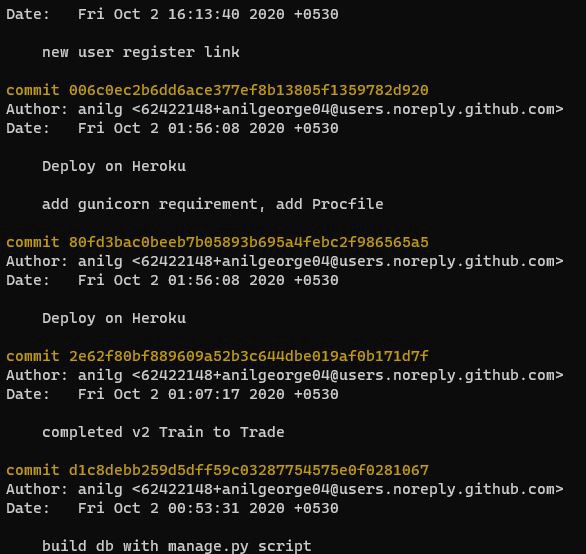
This is a neat, clean feature where you can see the log of all your commits and the movement of the branches in your development workflow. Here is what a simple git log command provides for a flask application that I was building:
git log
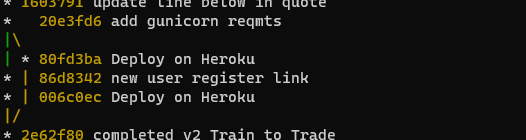
I don’t want to see the author and date and entire commit hash details each time, especially for an app that only I’m working on. A single line with commit message is all I need. When I was deploying this Trading application, I created a local branch to use Heroku. Later merged this with my master branch. I can see this history and single line for commits using the following flags along with git log.
git log --oneline --graph --decorate
oneline gives me each commit in a single line
graph and decorate plots the trajectory of the versions and branches using operators and colors
This is neat and crisp, and tells me what I need to know about my commits and when I branched out and merged back with the master branch.
Enjoy using these in your Git workflow.
To read more about Git commands, Git has excellent documentation here
To understand the theory behind Git, MIT Missing Semester has an excellent lecture by Anish here.
P.S: Master branch is now referred to as Main branch.
]]>Anil GeorgeCS50 Introduction to Computer Science2020-09-17T00:00:00+00:002020-09-17T00:00:00+00:00https://anilgeorge.blog/workbench/CS50
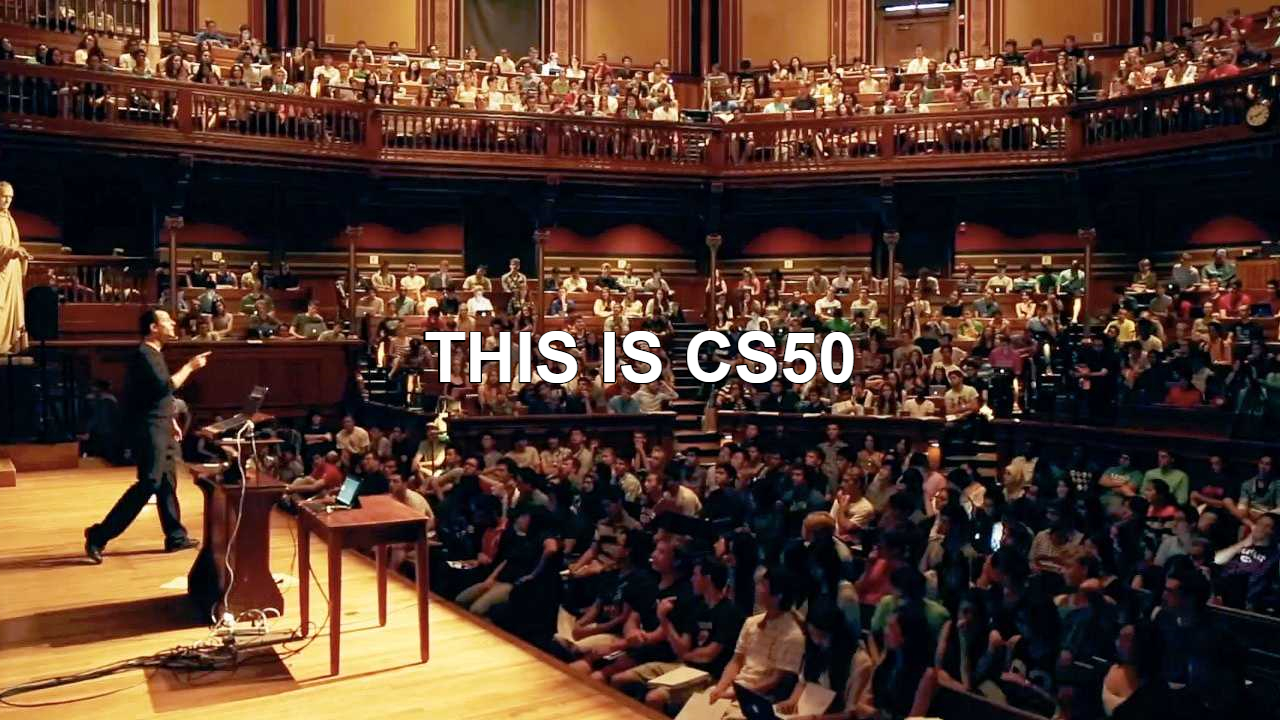
From tinkering around with a game on Scratch to building image filters on C to deploying a full-fledged web application using Flask, this repository contains some of my projects submitted for CS50 - Harvard University’s Introduction to Computer Science course taught by Professor David J. Malan.
I highly recommend CS50 to anyone looking to build their Computer Science Fundamentals.
Design
Problem definition is detailed in Problem Sets section for each week
The projects were built primarily using C and Python.
Special Note to CS50 students: Please follow the Academic Honesty Guide from CS50. Go over what’s reasonable and what’s not within the policy before going into any folder and sub-folder in this repository. You’ll thank yourself for it later.